
Appearance
API Tokens
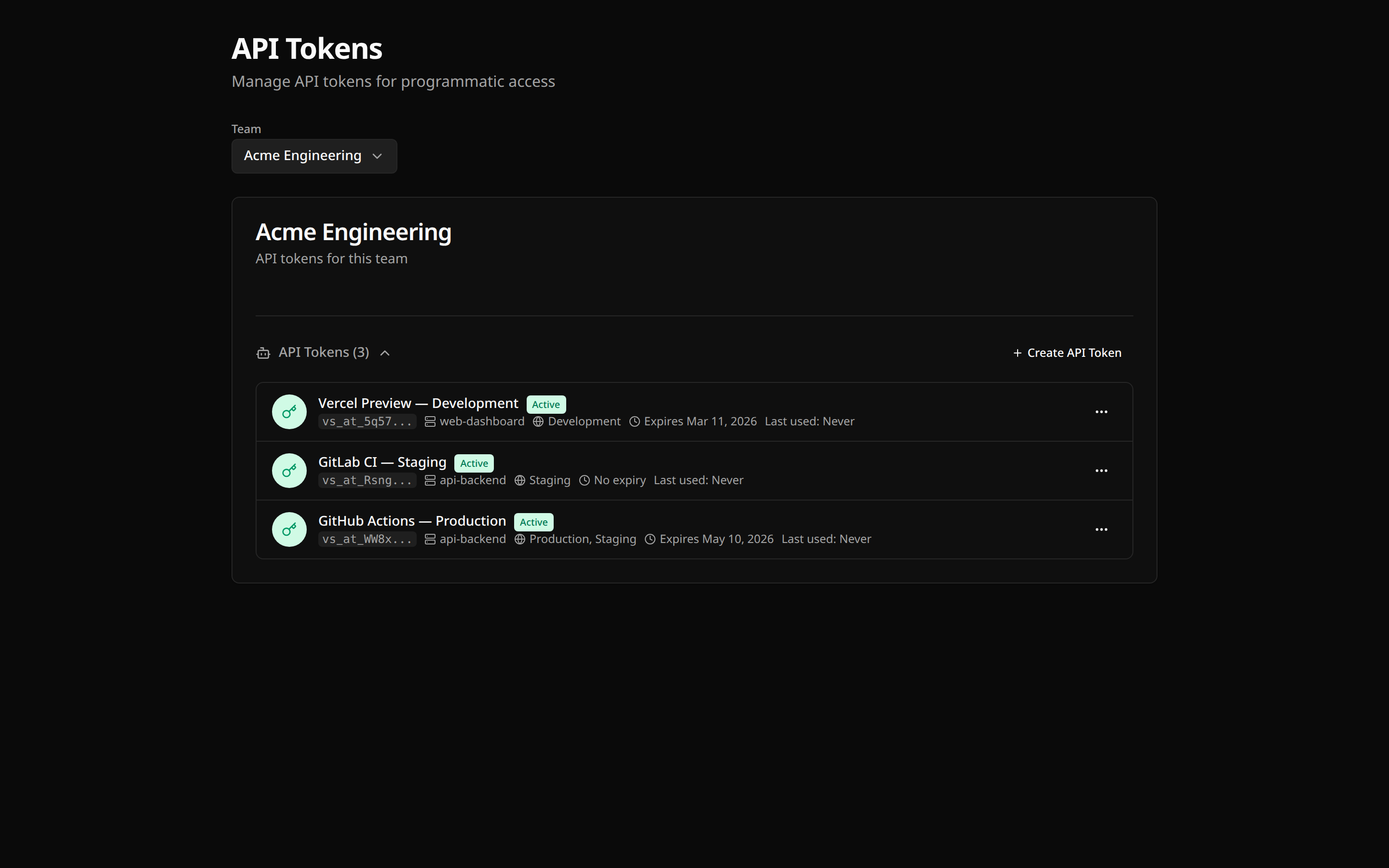
API tokens enable programmatic access to varsafe for CI/CD pipelines, automation scripts, and service accounts.
Overview
API tokens provide programmatic access without requiring an interactive login:
| Feature | User Session | API Token |
|---|---|---|
| Authentication | Browser-based login | Token in environment |
| Expiration | 30 days (rolling) | Never (until revoked) |
| Audit trail | Shows user email | Shows "Service Account" |
| Best for | Interactive CLI use | Programmatic access |
Use Cases
- CI/CD pipelines — Inject secrets during build, test, and deploy stages
- Automation scripts — Cron jobs, scheduled tasks, infrastructure tooling
- Server-side applications — Backend services that fetch secrets at startup
- Development tooling — Custom scripts, internal CLIs, IDE integrations
- Docker builds — Pass secrets during container image builds
- Infrastructure as Code — Terraform, Pulumi, or Ansible workflows needing credentials
Token Limits
Each plan has a maximum number of active API tokens per team:
| Plan | API Tokens |
|---|---|
| Developer (free) | 5 |
| Team | 50 |
When you reach the limit, you'll need to revoke unused tokens or upgrade your plan to create more.
Creating API Tokens
Via Dashboard
- Go to your team settings
- Navigate to API Tokens
- Click Create token
- Enter a descriptive name (e.g., "GitHub Actions - Production Deploy")
- Click Create
- Copy the token immediately
DANGER
The token is only shown once. If you lose it, you'll need to create a new one.
Token Format
API tokens follow this format:
vs_at_xxxxxxxxxxxxxxxxxxxxxxxxxxxxxxxxThe vs_at_ prefix identifies it as a varsafe API token.
Using API Tokens
CLI Login with Token
For persistent token auth (saves to credential store), use one of these secure methods:
bash
# Secure prompt — masked input, nothing in shell history
varsafe login -T

# Stdin pipe — from a CI secret or secure store
echo "$VARSAFE_TOKEN" | varsafe login -t -

# Environment variable — token in process memory only
VARSAFE_TOKEN=vs_at_xxx varsafe login
WARNING
Avoid varsafe login -t vs_at_xxx — the token appears in shell history and ps output.
See CLI Authentication for full details.
Environment Variable (headless)
For one-off commands without varsafe login, set VARSAFE_API_TOKEN (or VARSAFE_TOKEN as an alias):
bash
export VARSAFE_API_TOKEN=vs_at_your_token_here
varsafe run -p my-project -e production -- ./deploy.sh
When VARSAFE_API_TOKEN is set, the CLI uses it instead of your user session.
CI/CD Integration
yaml
name: Deploy

on:
  push:
    branches: [main]

jobs:
  deploy:
    runs-on: ubuntu-latest
    steps:
      - uses: actions/checkout@v4

      - name: Install varsafe CLI
        run: curl -fsSL https://varsafe.dev/install.sh | sh

      - name: Deploy with secrets
        run: varsafe run -p my-api -e production -- ./deploy.sh
        env:
          VARSAFE_API_TOKEN: ${{ secrets.VARSAFE_API_TOKEN }}
yaml
deploy:
  stage: deploy
  script:
    - curl -fsSL https://varsafe.dev/install.sh | sh
    - varsafe run -p my-api -e production -- ./deploy.sh
  variables:
    VARSAFE_API_TOKEN: $VARSAFE_API_TOKEN
yaml
jobs:
  deploy:
    docker:
      - image: cimg/node:18.0
    steps:
      - checkout
      - run:
          name: Install varsafe CLI
          command: curl -fsSL https://varsafe.dev/install.sh | sh
      - run:
          name: Deploy with secrets
          command: varsafe run -p my-api -e production -- ./deploy.sh
          environment:
            VARSAFE_API_TOKEN: ${VARSAFE_API_TOKEN}
groovy
pipeline {
    agent any
    environment {
        VARSAFE_API_TOKEN = credentials('varsafe-api-token')
    }
    stages {
        stage('Deploy') {
            steps {
                sh 'curl -fsSL https://varsafe.dev/install.sh | sh'
                sh 'varsafe run -p my-api -e production -- ./deploy.sh'
            }
        }
    }
}
Direct API Usage
You can also use tokens directly with the API:
bash
curl -X GET "https://api.varsafe.dev/secrets/with-values?projectId=xxx&environment=production" \
  -H "Authorization: Bearer vs_at_your_token_here"
Token Security
Best Practices
TIP
- One token per purpose — Create separate tokens for different pipelines
- Descriptive names — Name tokens clearly (e.g., "GitHub Actions - Staging")
- Regular rotation — Rotate tokens periodically (every 90 days recommended)
- Immediate revocation — Revoke tokens when no longer needed
- Secure storage — Store tokens in your CI/CD secrets management
What Tokens Can Do
API tokens have the same permissions as an admin:
- Read secrets from all environments
- Write secrets to all environments
- Cannot manage team members or settings
Audit Trail
All token usage is logged:
json
{
  "action": "secret.accessed",
  "actor": "Service Account",
  "actorId": "token_xxx",
  "source": "api",
  "ip": "203.0.113.42",
  "timestamp": "2026-02-15T10:30:00Z"
}
Token Rotation
Rotate tokens regularly for security:
- Go to team settings → API Tokens
- Click Rotate next to the token
- Copy the new token
- Update your CI/CD secrets
- The old token is immediately invalidated
TIP
Rotation generates a new token with the same name. Update your configurations promptly.
Token Revocation
If a token is compromised or no longer needed:
- Go to team settings → API Tokens
- Click Revoke next to the token
- Confirm revocation
WARNING
The token stops working immediately. Any pipelines using it will fail until updated with a new token.
Troubleshooting
"Invalid token"
- Verify the token is correct (no extra spaces or line breaks)
- Check if the token was revoked in the dashboard
- Ensure
VARSAFE_API_TOKEN(orVARSAFE_TOKEN) is set correctly - Try
varsafe login -Tto paste the token with masked input
"Token not authorized"
- The token may have been created for a different team
- Check if the project belongs to the token's team
"Rate limited"
API tokens share rate limits:
- 1000 requests per minute per team
If you need higher limits, contact support.
Multiple Environments
For different environments, you can either:
Option 1: One token, specify environment
bash
# Same token, different -e flag
varsafe run -p my-api -e staging -- ./deploy.sh
varsafe run -p my-api -e production -- ./deploy.sh
Option 2: Separate tokens per environment
Create distinct tokens for staging vs production for better audit separation.
TIP
For most teams, a single token per CI/CD platform works well. Use separate tokens when you need clear audit separation between environments.
Security Checklist
- [ ] Tokens stored in CI/CD secrets, not in code
- [ ] Each pipeline has its own token
- [ ] Unused tokens are revoked
- [ ] Token rotation scheduled (every 90 days)
- [ ] Audit logs reviewed regularly