API tokens
Reference for varsafe API tokens — creation, project and environment scoping, expiration, rotation, revocation, and security properties.
An API token gives a pipeline, a server or a headless agent access to secrets without anyone signing in. Each token belongs to one team, can be narrowed to the projects and environments it needs and to read-only, and expires on a date you choose (tokens created before that rule, with no expiry, stop working after 90 days unused). For step-by-step pipeline setup, see the CI/CD guide.
At a glance
| Who can create one | Team owners and admins, from the dashboard |
| Reach | One team, optionally narrowed to one or more projects and environments |
| Access level | Read secrets, or read and change them |
| Lifetime | 1, 7, 30 or 90 days, or 1 year; never longer than the plan allows |
| Format | Starts with vs_at_, shown once, stored only as a salted hash |
| In the audit log | Appears as the token, by name, not as the person who created it |
| Stops working when | It expires, is revoked or rotated, or its creator leaves the team or changes role |
| Plan | Longest lifetime | Active tokens per team |
|---|---|---|
| Developer | 90 days | 500 |
| Team | 1 year | 2,000 |
The token cap is an abuse limit, not a pricing tier; contact support if you need more.
Token or browser login?
| Your CLI login | API token | |
|---|---|---|
| Use it for | Your own machine | CI/CD, servers, scripts, headless agents |
| Signs in with | Your browser | A token in the job’s environment |
| Reaches | The teams you belong to, with your role | One team, within its scope |
| Expires | 180 days at most, 90 days unused | The lifetime you chose |
| Audit trail shows | You | The token |
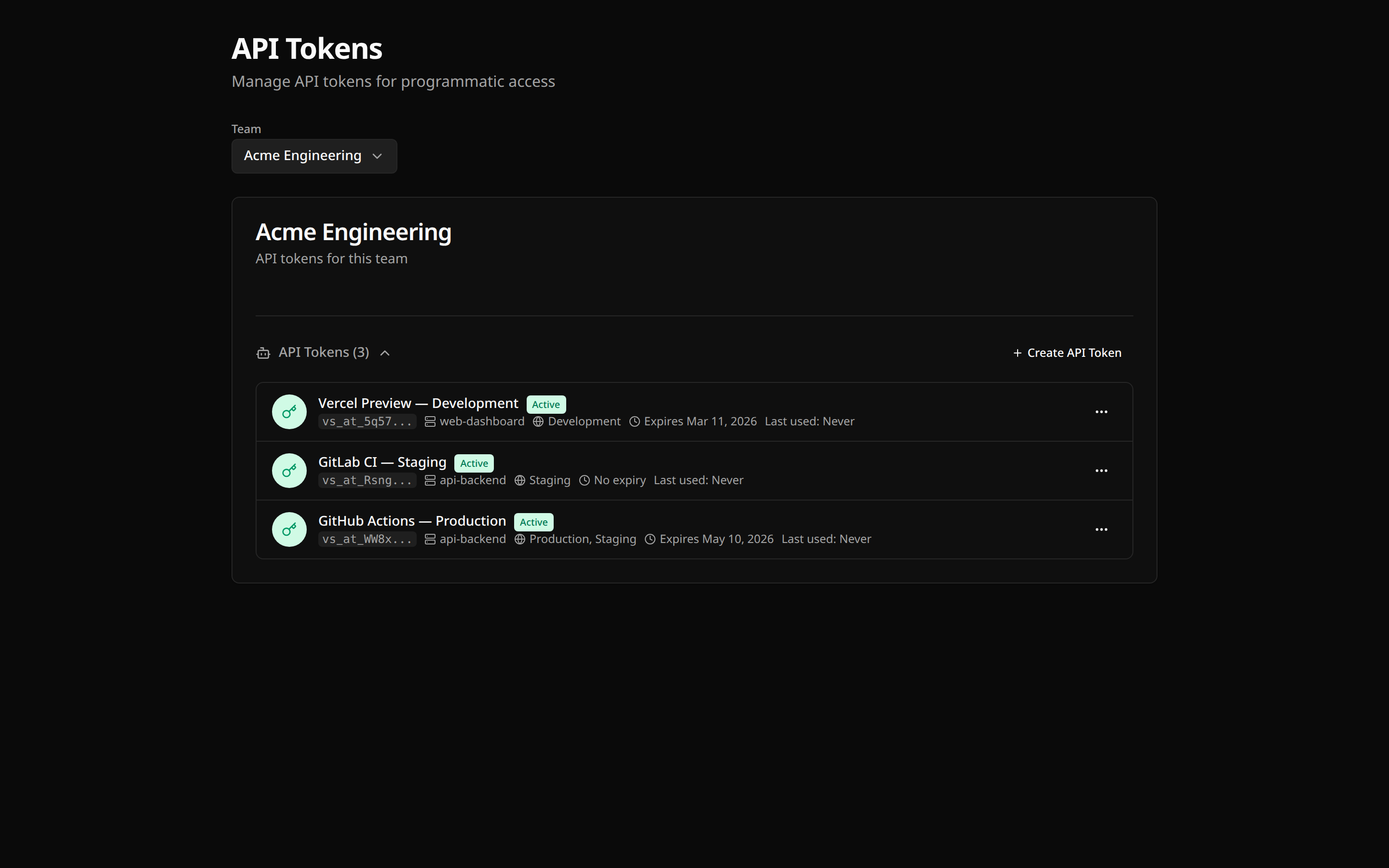
Creating a token
Open the API tokens page
In the dashboard sidebar, open Access → API tokens.
Name it
Click Create API Token and give it a name that says where it runs, such as “GitHub Actions – production deploy” (1–100 characters).
Choose what it can do, where, and for how long
The fields, in the order the form shows them:
| Field | Starts on | Choose |
|---|---|---|
| What can this token do? | Read and change secrets | Read secrets, unless the job writes secrets |
| Let an AI agent use this token over MCP | Off | On only for a token an agent uses: see MCP scopes |
| Expires after | 90 days | The shortest lifetime your rotation habit supports |
| Scope › Projects | All projects | A project, or keep All projects |
| Scope › Environments | All environments | The environments it needs, or keep All environments |
Create and copy the token
Click Create token and copy the token immediately.
Scope
A token reaches its team’s projects and environments unless you narrow it. Narrowing is checked by the API on every request.
Protected environments
A protected environment accepts changes from owners and admins only. A token has no role, so its scope decides: a write token changes a protected environment only when it was created for that environment.
Non-protected
Read secretsRead-only
Read and change secretsRead and write
Protected, chosen when the token was created
Read secretsRead-only
Read and change secretsRead and write
Protected, reached through All environments
Read secretsRead-only
Read and change secretsRead-only
A token for all environments still reads protected environments, so a deploy can inject production, but its writes there are refused with:
API_TOKEN_NOT_SCOPED_TO_PROTECTED_ENVIRONMENT- Choosing an environment at creation is what allows it. Choosing
productionwith All projects covers the production environment of every project that exists then. - A token keeps its access to an environment that is protected after the token was created: it was chosen for that environment.
- Older tokens that named environments were converted to the environments those names matched at the time, and follow the same rule.
- A token’s scope cannot be changed later. To let a pipeline write a protected environment, create a write token for that environment and revoke the old one.
The dashboard narrows a token to one project or all of them. The API accepts a list of projects (projects, by ID) and environments (environments, by slug). Environment slugs are resolved when the token is created: an environment added later with the same slug is not reached.
Access level
Every token has an action ceiling, checked separately from its scope.
| Level | Dashboard label | Effect |
|---|---|---|
read |
Read secrets | Read secret values in scope. Creating, updating, rotating, rolling back and deleting are refused |
write |
Read and change secrets | Read, create, update, rotate, roll back and delete secrets in scope; in a protected environment, only when the token was created for it |
Use read-only for anything that only consumes secrets: a CI job that injects configuration, a service that reads config at boot, a script that inventories keys.
The level stops writes to varsafe. It does not stop the machine holding the token from saving what it read: varsafe export --plain works with a read-only token.
Narrowing an existing token
Choose Make read-only in the token’s menu. The token keeps working, with the narrower ceiling, from the next request. A write that already passed its check finishes; revoke the token if you need to stop work in flight.
This only goes one way. A read-only token cannot be widened back to write: create a new token instead.
Check what a token can do
Ask the API, with the token itself:
curl -sH "Authorization: Bearer $VARSAFE_API_TOKEN" https://api.varsafe.dev/me/verifyThe response includes the token’s accessLevel. varsafe whoami shows the token’s name, team, projects and environments.
Using a token
Set the token in the job’s environment and the CLI uses it, with no login step. VARSAFE_API_TOKEN is the primary variable; VARSAFE_TOKEN is accepted when it is not set.
export VARSAFE_API_TOKEN=vs_at_vsafe_example
varsafe run -p my-api -e production -- ./deploy.sh
On a machine where someone has run varsafe login, the stored login takes precedence over the variable: check with varsafe whoami.
varsafe run removes the token variables from the command it starts, so the deploy script does not inherit the credential. Pass --pass-credential when the command itself calls varsafe.
To keep a token on a workstation instead, store it with a login. These keep the value out of shell history:
# Masked prompt
varsafe login -T

# From a pipe, e.g. a password manager
secret-manager read varsafe-token | varsafe login -t -
Storing a token with varsafe login needs the operating system keychain, so it fails on a CI runner, which has none. In CI, use the environment variable. All the ways to supply a token are in CLI authentication, and pipeline recipes in the CI/CD guide.
Rotation
Rotation replaces the token with a new value, in one step:
- Open Access → API tokens
- Choose Rotate in the token’s menu
- Copy the new token and update your CI/CD secret
The new token keeps the name, scope, access level, MCP scopes and expiry date of the old one: rotating does not extend a token’s life. The person who rotates it becomes its creator, so their membership governs it from then on.
Revocation
- Open Access → API tokens
- Choose Revoke in the token’s menu and confirm
Revocation is permanent and applies to the next request. A token can also revoke itself, with no admin involved: DELETE /me/token with the token as the Bearer credential. Use it when a pipeline detects that its token leaked.
Tokens also stop working without anyone revoking them:
| Event | Effect on the tokens that person created |
|---|---|
| The creator is removed from the team, or leaves | Revoked |
| The creator’s role changes | Revoked |
| The creator is deactivated | Keep working through the 7-day grace period, then stop |
| The creator resets their password | Revoked |
Before you remove an admin who set up your pipelines, rotate their tokens yourself so the pipelines move to a token you own.
MCP scopes
A token can also authenticate an AI agent against the hosted MCP endpoint, on a machine with no browser or when the agent should act as something other than your own account. In the create form, turn on Let an AI agent use this token over MCP. Client setup is in the MCP guide.
This is opt-in per token: a token with no MCP scopes is refused by the MCP endpoint.
- The access level bounds it. A read-only token cannot hold
secrets:write, and making a token read-only removes that scope in the same change. - Scopes only shrink. They can be removed, never added. Removing all of them switches the agent surface off and leaves the token working for the HTTP API.
- Protected environments apply over MCP exactly as over the API: an agent using the token changes a protected environment only when the token was created for that environment, and the creator’s current role is checked as well.
Agent actions through a token are audited as the token.
Managing tokens over the API
Everything under /teams/{teamId}/api-tokens (create, list, rename, change access level, rotate, revoke, delete) requires a signed-in owner or admin dashboard session. Those routes do not accept a Bearer token, so a token cannot create or change tokens. The one exception is DELETE /me/token, above.
Creating a read-only token over the API:
{ "name": "ci-inject", "accessLevel": "read" }An omitted accessLevel gives a read token, and an omitted expiry gives the plan’s longest lifetime. The body is strict: a misspelled key such as accessLevell is rejected with 400, rather than ignored and answered with a wider token than you asked for.
The token list also returns each token’s creator and the IP address and user agent of its last use. The dashboard row shows the last use the same way: when, from which address, and with which client, for example Last used Oct 8, 2026 · 203.0.113.7 · curl/8.4.0. Revoked tokens leave the dashboard list; DELETE removes one from the API’s records too.
Choosing scopes for several environments
One token per environment is the safer default. A token scoped to staging and another to production keep a misconfigured staging job from reading production, and the audit log tells the two apart.
One token for all environments, choosing at run time, is simpler but means every job holding it can read production. It cannot change production or any other protected environment:
varsafe run -p my-api -e staging -- ./deploy.sh
varsafe run -p my-api -e production -- ./deploy.sh
Troubleshooting
Invalid token
- Check the value for extra spaces or line breaks
- Check whether it expired, was revoked, or was rotated (Access → API tokens)
- Check whether its creator left the team or changed role
- Check that
VARSAFE_API_TOKEN(orVARSAFE_TOKEN) is set in the step that runs the command
Token not authorized
- The token may belong to a different team than the project
- The project or environment may be outside the token’s scope:
varsafe whoamilists what it reaches - A read-only token is refused on writes
- A write token is refused on a protected environment it was not created for: create one for that environment
Rate limited
A token gets the signed-in API rate: 50 requests per second, 250 per 10 seconds and 1,000 per minute, in its own bucket. Throttled pipelines usually read keys one at a time in a loop; varsafe run fetches an environment in one call. For sustained higher limits, contact support.
More errors and fixes are in the troubleshooting guide.
Security checklist
- Tokens live in your CI/CD secret store, never in code
- One token per pipeline
- Read-only unless the job writes secrets
- Each token reaches only the projects and environments its job uses, and is created for a protected environment only when the job changes secrets there
- Lifetimes are the shortest you can rotate on
- Unused tokens are revoked
- The audit log is reviewed for token activity